 FlipYear
My Grandmother's Photo Album Weighs About Three Pounds
It sits on the bottom shelf of her bookcase, next to a smaller one from the 1970s and a shoe box full of loose prints she never got around to organizing. The leather cover is cracked. Some of the photos have yellowed. A few have fallen out of their sleeves and she's tucked them back in slightly crooked.
I love that album.
I also have 47,000 photos on my iPhone and exactly zero albums to show for them. That number isn't unusual — Apple says the average iPhone user takes over 2,000 photos per year, and most of us have been doing this for a decade or more. The photos pile up. The albums don't.
So when apps started offering "3D digital flipbooks" as an alternative to physical photo albums, I was skeptical but curious. Can a screen really replace the thing sitting on my grandmother's shelf? I've spent the last year using one (FlipYear, which we built), and I have some honest thoughts about where digital wins, where physical still wins, and why I think most people will end up using both.
What Exactly Is a 3D Digital Flipbook?
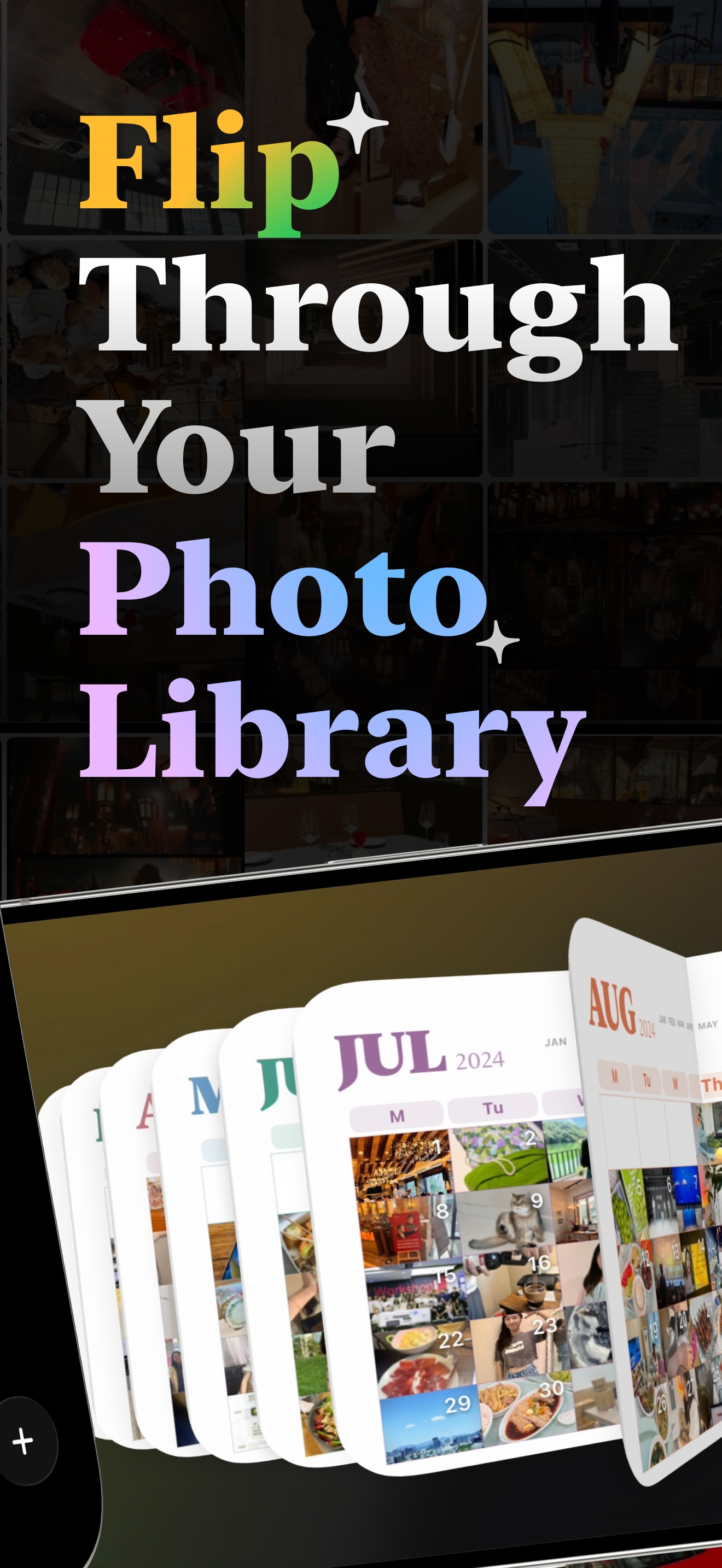
The name is a mouthful, but the concept is simple. It's a photo book on your phone where the pages actually turn. Not a slideshow. Not a grid. When you swipe, the page curls over with a 3D animation — shadows, perspective, the whole thing. It looks and feels surprisingly close to turning a real page.
The better apps (like FlipYear) go further and create these books for you automatically from your phone's photo library. You don't design anything. You open the app and there's a flip book for 2019, one for 2020, one for 2021, and so on. Each one organized by month.
It's a different experience than scrolling through your camera roll. Slower. More deliberate. You're flipping through a book, not scanning a feed.
What Physical Albums Still Do Better
I want to be honest about this, even though I make a digital flipbook app. Physical albums have things going for them that screens can't touch.
The weight of a book in your hands. Turning a real page. The fact that an album sitting on your coffee table is always there — you don't need to open an app or charge a battery. When guests come over, a photo book on the table starts a conversation in a way an app on your phone doesn't.
There's also the effort factor, and I mean that as a positive. When someone makes a physical album — picks the photos, arranges them, sends it to the printer — there's care behind it. My wife made one for our wedding and it took her weeks. The finished book feels like a gift because it was work. That labor is part of the value.
And durability isn't nothing. My grandmother's album has survived 50+ years, two house moves, and a basement flood. It's still there. Try saying that about any app from 2004.
Where Physical Albums Fall Apart
Here's the thing, though. My grandmother had maybe 500 photos from the entire 1980s. I take 500 photos on a long weekend.
The math just doesn't work for physical albums anymore. A nice printed photo book holds maybe 30-50 pages. A premium one from Artifact Uprising or Shutterfly costs $40-$80. If you wanted to make one for every year of your iPhone's life, you'd spend $400-$800+ and still only cover a tiny fraction of your photos. And you'd need to actually make all those books, which means selecting photos, designing layouts, ordering, waiting for shipping.
Nobody does this. I don't know a single person who has a printed photo book for every year.
Physical albums also stay home. You can't pull out your 2018 photo album at Thanksgiving dinner across the country. You can't show your college roommate your 2016 photos on a whim. The book is wherever you left it.
And let's talk about risk. Fire, flood, moving — any of these can destroy a physical album permanently. Once those prints are gone, they're gone. (Your iPhone photos, on the other hand, are backed up to iCloud whether you think about it or not.)
What 3D Digital Flipbooks Get Right
The biggest advantage is absurdly simple: they exist. FlipYear made a yearbook for every year in my library without me doing anything. That's 12 flip books I never would have created on my own. They're just there, waiting for me to open them.
The 3D page-turn animation matters more than I expected it to. I thought it would be a gimmick, but it changes the pace. When I scroll my camera roll, I blast through photos at a hundred per minute. When I flip through a FlipYear book, I spend maybe 5 seconds on each page. The animation forces a pause. It's closer to the rhythm of flipping through a real book than I would have guessed.
Having every year on your phone is great for random moments. Last week someone asked me about a trip from 2019. I pulled it up in FlipYear in about four seconds. With a physical album, the answer would have been "I think there's a photo somewhere at home."
Cost is a factor too. FlipYear is a free download. No printing, no shipping, no $60 per book.
What 3D Digital Flipbooks Get Wrong
I'm not going to pretend digital has no downsides. It does.
You can't put a digital flipbook on your coffee table. It doesn't have a physical presence in your home. Nobody's going to walk past your bookshelf and pull out your FlipYear app to browse.
Screen fatigue is real. After eight hours of staring at a laptop, opening another screen to look at photos doesn't always feel appealing. A physical book is a break from screens. A digital flipbook is more screen.
And there's a gifting problem. If you want to give someone a photo book as a present — for a birthday, Mother's Day, a retirement party — a printed book wrapped in paper hits completely differently than "hey, download this app." Physical albums are gifts. Digital ones are recommendations.
The Numbers Side by Side
| Physical Album | 3D Digital Flipbook | |
|---|---|---|
| Time to create | 3-8 hours per book | Zero (automatic) |
| Cost per book | $30-$80+ | Free or ~$1/month |
| Photos per book | 30-100 | All of them |
| Where it lives | Your shelf | Your pocket |
| How it feels to browse | Warm, physical, slow | Smooth, animated, slow |
| How many you'll realistically make | 1-3 ever | One per year, automatically |
| Privacy | It's in your house | On-device only (FlipYear) |
| Can survive a house fire | No | Yes (cloud backup) |
| Good as a gift | Yes, very | Not really |
Why I Think Most People Need the Digital Version
This isn't because digital is "better." It's because of that one row in the table: "How many you'll realistically make."
I'll make a physical album for my wedding. Maybe for my kid's first year. Special occasions. But I'm not going to make a printed book for 2021. Or 2017. Or 2023. Those years happened, I took thousands of photos, and without something like FlipYear, those photos just sit in the camera roll getting older and harder to find.
A digital flipbook covers the 95% of years that will never get a printed album. And the 3D page-turn animation gives those years a way to be browsed that's closer to flipping through a real book than scrolling a grid of tiny thumbnails.
That's the real argument. Not "digital vs. physical." It's "having yearbooks for every year vs. having yearbooks for almost none of them."
What FlipYear Adds on Top
Full disclosure: I'm biased here since we built FlipYear. But the features that go beyond basic flipbooks are the ones I use most. The Year Wheel lets me spin between decades of photos in a second. On This Day shows me what I was doing on this date in 2018 or 2020. Home screen widgets put a random old photo on my lock screen throughout the day.
And everything stays on my iPhone. No uploads, no cloud processing, no account needed. After seeing how many photo apps want to ship your library to their servers, I'm stubborn about this one. Your photos shouldn't need to leave your phone for an app to organize them.
Try FlipYear Free
Automatic yearbooks for every year on your iPhone.
So Which Is Better?
Both, for different things.
If you're making something for a wedding, a milestone birthday, a gift for your parents — print a physical album. That book will sit on a shelf for decades and it will mean something because you made it.
For everything else — the 10+ years of iPhone photos you have no other plan for — get a digital flipbook app. You'll end up with a yearbook for every year you've owned a phone, and you'll actually look at them. That's more than most people can say about their camera roll.
← Back to Blog