 FlipYear
You Have the Photos. You Just Can't Find Them.
I checked my camera roll last week. 47,000 photos. Forty-seven thousand. Birthday cakes, blurry sunsets, screenshots of things I'll never look at again, and somewhere in there, the first photo I ever took of my dog.
Good luck finding it.
This is the reality for most iPhone users. We take more photos in a single month than our parents took in a decade, and all of them end up in one giant reverse-chronological scroll that nobody has the patience to browse. The photos exist. The organization doesn't.
I've tried the traditional route. I signed up for one of those photo book printing services a couple years ago, planning to make a nice 2024 yearbook. I got as far as selecting 30 photos before I gave up. Choosing which photos to include out of 8,000+ candidates felt impossible, and I hadn't even started the layout yet. The project is still sitting in my drafts somewhere.
I don't think I'm unusual. Most people want a photo book. Almost nobody finishes one.
What Would the Ideal Yearbook Look Like?
I think about this a lot, partly because we built FlipYear to answer exactly this question. A good year-in-review photo book needs a few things.
First, it should organize by month. A year told January through December has a natural rhythm to it — winter, spring, summer, fall. You remember where you were in March differently than August. Months give a year its chapters.
Second, it should pick your best photos without being asked. If you've hearted photos in your camera roll, those should show up. If you haven't, the app should still figure out which shots matter most. Nobody wants to hand-select 500 photos.
Third — and this is the one that kills every other photo book service — it should require zero effort. If making the book takes a full Saturday afternoon, most people will do it once and never again. A yearbook that builds itself is the only yearbook most people will ever have.
And finally, scrolling through a flat grid of tiny thumbnails isn't fun. The experience of flipping through a book — an actual book with pages that turn — hits differently than tapping through a slideshow.
How FlipYear Actually Works
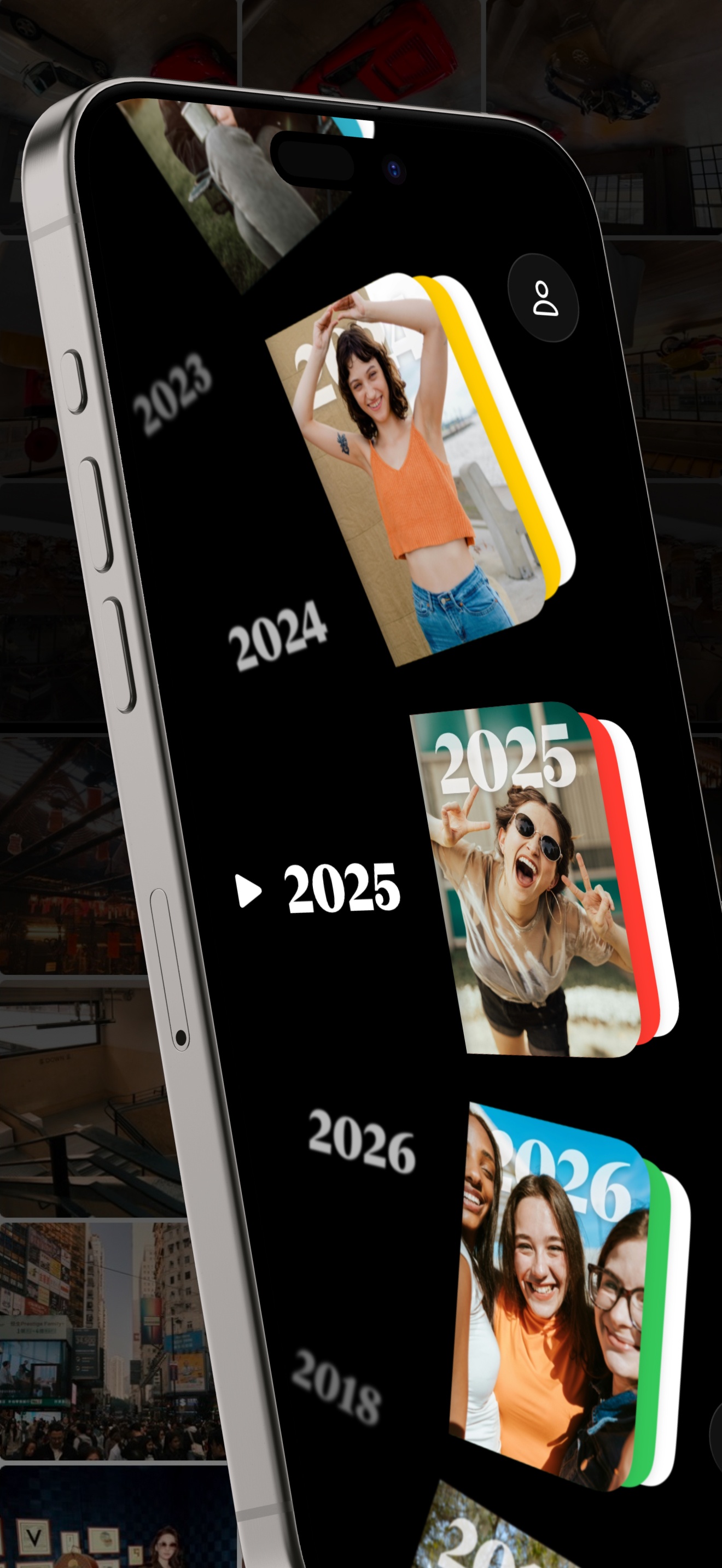
FlipYear is the app we built to solve this. You open it, give it access to your photo library, and it does the rest. No wizards, no templates, no "start new project" buttons. When the app loads, your yearbooks are already there — one for every year you've taken photos, going back as far as your library goes.
I have yearbooks going back to 2014 on mine. I didn't set any of them up.
The Monthly Calendar Layout
Each yearbook has 12 pages. One per month. Your photos from January sit on the January page, laid out in a clean calendar grid. It sounds simple, and it is — but that simplicity is the whole point. You open a year, flip to a month, and see what you were doing. No digging through infinite scroll.
The Page-Turn Thing
Okay, this is the part that's hard to describe in text. When you swipe to the next month, the page curls and flips over like an actual paper page. Full 3D, with shadows and everything. It works in both portrait and landscape.
I know how that sounds. "Cool animation, who cares." But the reason it matters is that it slows you down. In a good way. Instead of tapping through a grid as fast as possible, you're flipping pages one at a time, spending a second on each month. It turns photo browsing from something you rush through into something you sit with. My mom spent 20 minutes flipping through her 2019 yearbook the first time she tried the app. She doesn't do that with the Photos app.
Which Photos Get Picked
FlipYear looks at your favorited photos first — the ones with the little heart in Apple Photos. If you've been hearting your best shots (and a lot of people do this casually without thinking about it), those get priority. For months where you haven't favorited much, it pulls from the full library.
You can also set your own cover photo for each year, or let the app pick one.
Jumping Between Years
If you've got a decade of photos, you don't want to swipe through ten yearbooks to get to 2016. FlipYear has a thing called the Year Wheel — a spinning dial that lets you jump to any year instantly. It's a small detail, but it's the kind of thing that makes the difference between "I used this once" and "I actually use this."
Try FlipYear Free
Your photo library, organized into yearly flip books.
The Other Stuff: On This Day, Widgets, Custom Albums
The yearbooks are the main thing, but FlipYear does a few other things worth mentioning.
On This Day pulls up photos from the same date in past years. Apple Photos has a similar feature, but FlipYear's version sends you a notification and shows the photos in context of that year's flip book. It's a nice daily surprise — sometimes it surfaces a photo I completely forgot existed.
Widgets put a rotating photo from your library on your home screen or lock screen. I have one on my home screen. It changes throughout the day. It's a small thing but it means I see old photos without actively opening any app.
Custom Albums let you build a flip book from any set of photos you choose. Want a flip book of just your 2023 Japan trip? Pick those photos and FlipYear makes one. Same 3D page-turn experience, just with your own selection instead of a whole year.
The Privacy Thing
This matters more than people think. Most photo book services upload your photos to their servers to process them. FlipYear doesn't. Everything — the sorting, the layout, the rendering — happens on your iPhone. Your photos don't go anywhere.
No server. No account. No tracking. The app literally cannot see your photos outside of your device. We built it this way on purpose, because the idea of uploading 47,000 personal photos to somebody's cloud server felt wrong.
The Yearbook You Won't Have to Make
That's the real pitch, honestly. It's not that FlipYear makes better photo books than a professional printing service — a $60 Artifact Uprising hardcover is going to look nicer on your coffee table. But you have to actually make that book. You have to pick the photos, design the layout, pay for it, wait for shipping.
FlipYear's yearbooks exist the moment you open the app. They cover every year. They update as you take new photos. And you can flip through them at a family dinner or on a plane without needing to lug anything around.
I've had the app on my phone for over a year now, and the yearbook I flip through most is 2018. I have no idea why. Something about that year just had good photos. I never would have known that if I'd had to manually build a book for it.
Give It a Try
Free on the App Store. Your yearbooks are already waiting.